

If you’ve spent even ten minutes researching web hosting, you already know the problem: every provider claims to be “the fastest,” “the cheapest,” and “the easiest to use for beginners.” It’s hard to know who’s telling the truth. This Hostinger review 2026 cuts through the marketing noise and looks at what actually matters to a beginner — price, ease of use, speed, uptime, security, and support — using the latest independent test data and real feature breakdowns.
By the end of this guide, you’ll know exactly whether Hostinger is the right web host for your first website, blog, portfolio, or online store, and how it stacks up against the other big names in hosting.
“Ready to stop comparing and start building? Get Hostinger’s beginner plan now
Quick Verdict: Is Hostinger Worth It in 2026?
For most beginners, yes. Hostinger remains one of the most beginner-friendly and affordable hosting providers on the market in 2026. It combines a modern, jargon-free control panel (hPanel), genuinely fast NVMe and LiteSpeed-powered servers, a free AI website builder, and 24/7 live chat support — all starting at a very low introductory price.
The trade-off is renewal pricing. Hostinger’s headline rates apply only to your first billing term (up to 48 months), and prices increase noticeably when your plan renews. If you go in with realistic expectations about long-term costs, Hostinger is very hard to beat for beginners who want a fast, simple, and affordable way to get online.
What Is Hostinger?
Hostinger is a Lithuania-based web hosting company that has grown into one of the largest hosting providers in the world, now serving several million customers across more than 150 countries. It offers shared hosting, WordPress hosting, WooCommerce hosting, cloud hosting, VPS hosting, and a standalone AI-powered website builder, along with domain registration and business email.
What sets Hostinger apart from legacy hosts like Bluehost or GoDaddy isn’t just the price — it’s the experience. Hostinger built its own control panel, called hPanel, from scratch instead of licensing the decades-old cPanel software most competitors still use. The result feels closer to a modern SaaS dashboard than a technical server management tool, which is exactly what makes it approachable for people who have never managed a website before.
“Ready to stop comparing and start building? Get Hostinger’s beginner plan now
Overview & Control Panel Experience: hPanel vs. Old-School cPanel
Anded a toolbox with a built-in instruction card for each one.
This is ultimately why so many 2026 reviews single out hPanel as Hostinger’s strongest advantage for beginners specifically — not because the underlying hosting infrastructure is dramatically To understand why Hostinger has become such a popular choice for beginners, it helps to compare what most people expect from a hosting dashboard against what Hostinger actually delivers.
The old way: cPanel. For nearly two decades, cPanel has been the default control panel for the majority of shared hosting providers, including many of Hostinger’s competitors. It works, but it was designed in an era when the people using it were mostly developers and IT administrators. The interface is a dense grid of dozens of icons — file managers, cron jobs, DNS zone editors, PHP version selectors — with little explanation of what any of it means or when you’d actually need it. A first-time website owner logging into cPanel is often met with more confusion than clarity, and simple tasks like installing WordPress or checking storage usage can require several unrelated clicks through unfamiliar menus.
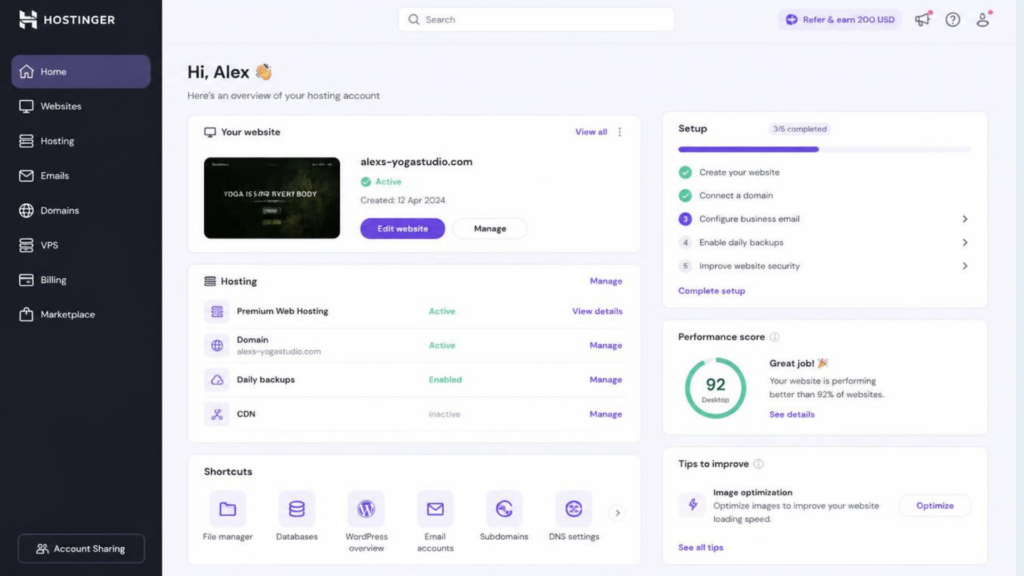
The new way: hPanel. Hostinger built hPanel as a ground-up replacement, specifically designed around how beginners actually think about their website rather than how a server is technically structured. Instead of a wall of icons, hPanel organizes everything around clear categories — Websites, Domains, Emails, Billing, Security — each with plain-language labels and short explanations of what each setting does. Common first-time tasks, like installing WordPress, connecting a domain, or setting up email, are handled through step-by-step guided wizards rather than assuming you already know the terminology.
A few specific things stand out about the hPanel experience:
- A single unified dashboard shows your website’s status, resource usage, and security alerts at a glance, without needing to dig through separate menus to understand how your site is performing.
- In-panel AI assistance (Kodee) sits behind an “Ask AI” button at the top of the interface, so if you’re ever unsure what a setting does, you can ask in plain English and get a direct answer along with the exact path to fix it — instead of leaving the dashboard to search online.
- Guided onboarding flows walk new users through the first few critical steps — domain setup, SSL activation, and website creation — in a linear sequence, rather than expecting you to figure out the right order on your own.
- Visual resource monitoring displays things like storage, bandwidth, and visitor traffic using simple graphs and progress bars instead of raw server logs, so you can understand your site’s health without technical knowledge.
- Account sharing with scoped access lets you invite a developer, freelancer, or virtual assistant to manage specific parts of your account without ever sharing your main password — useful once your project grows beyond a solo effort.
The practical difference this makes for a beginner is significant. Tasks that might take an unfamiliar cPanel user 20–30 minutes of trial and error — installing WordPress, pointing a domain, activating SSL — typically take a few minutes in hPanel, because the interface tells you what to do next instead of assuming you already know. It’s the difference between being handed a toolbox with unlabeled tools versus being hdifferent from competitors, but because the layer between you and that infrastructure is designed for people who’ve never done this before.
“Ready to stop comparing and start building? Get Hostinger’s beginner plan now
Speed & Uptime Performance
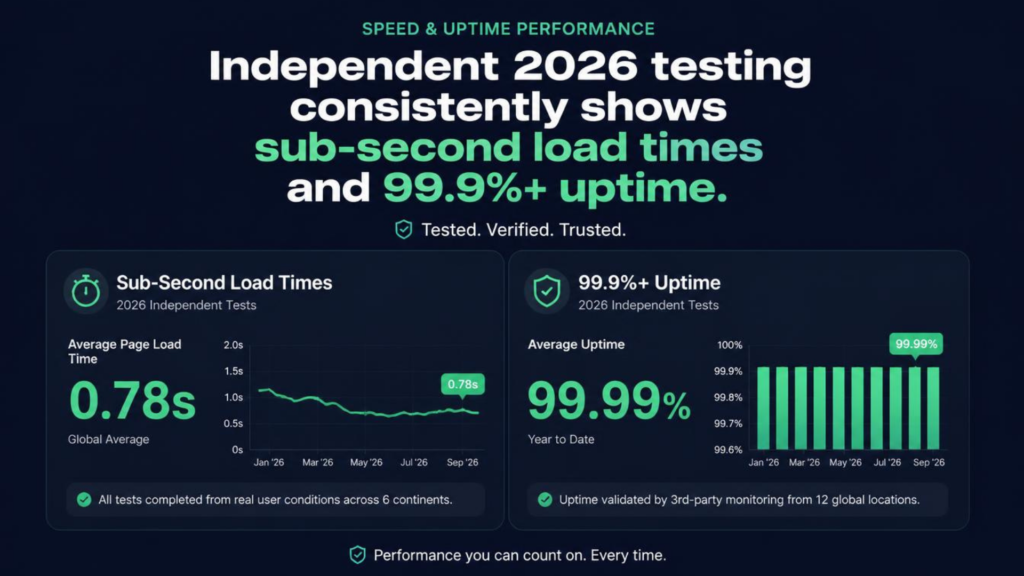
Speed and reliability can make or break the user experience. Independent 2026 performance testing consistently highlights.
Sub-second loading times and 99.9%+ uptime, helping websites deliver a fast, stable, and dependable experience for visitors.
Lightning-Fast Loading: Pages are designed to load in under a second under optimized testing conditions, reducing waiting time and helping improve user engagement.
99.9%+ Uptime: High availability means your website remains accessible and operational around the clock, minimizing disruptions and potential lost visitors or sales.
Smooth User Experience: Fast response times help create a more seamless experience across desktop, tablet, and mobile devices.
Better Business Performance: Faster websites can support stronger engagement, lower bounce rates, and a smoother conversion journey—especially for landing pages, online stores, and lead-generation websites.
Reliable Infrastructure: Consistent performance provides businesses with the confidence that their digital presence can handle everyday visitor traffic without unnecessary downtime.
Bottom line: Speed isn’t just about loading a page quickly—it’s about creating a website experience that feels instant, reliable, and ready when your customers are.
Security & Protection

Your website deserves protection from the moment it goes live. Security features such as free SSL, regular backups, malware scanning, and DDoS protection are bundled into every plan, helping businesses protect their website, data, and visitors without having to purchase multiple security add-ons.
Free SSL Protection: SSL encryption helps secure information exchanged between your website and visitors while also providing the familiar HTTPS experience users expect.
Reliable Backups: Built-in backups help create an additional layer of protection, making it easier to recover website content if something goes wrong.
Malware Scanning: Automated security checks can help identify suspicious or potentially harmful activity, allowing potential threats to be detected earlier.
DDoS Protection: Protection against Distributed Denial-of-Service attacks helps reduce the impact of malicious traffic designed to overwhelm your website and make it unavailable.
Security Included: Instead of paying separately for essential protection features, these tools are included with every plan, making website security simpler and more cost-effective.
Peace of Mind: With multiple layers of protection working together, you can focus more on growing your website and business rather than constantly worrying about common online threats.
Bottom line: Strong website security shouldn’t be an optional extra. With essential protection included from the start, you get a safer and more dependable foundation for your online presence.
“Ready to stop comparing and start building? Get Hostinger’s beginner plan now
AI Website Builder — From Idea to Live Website Faster
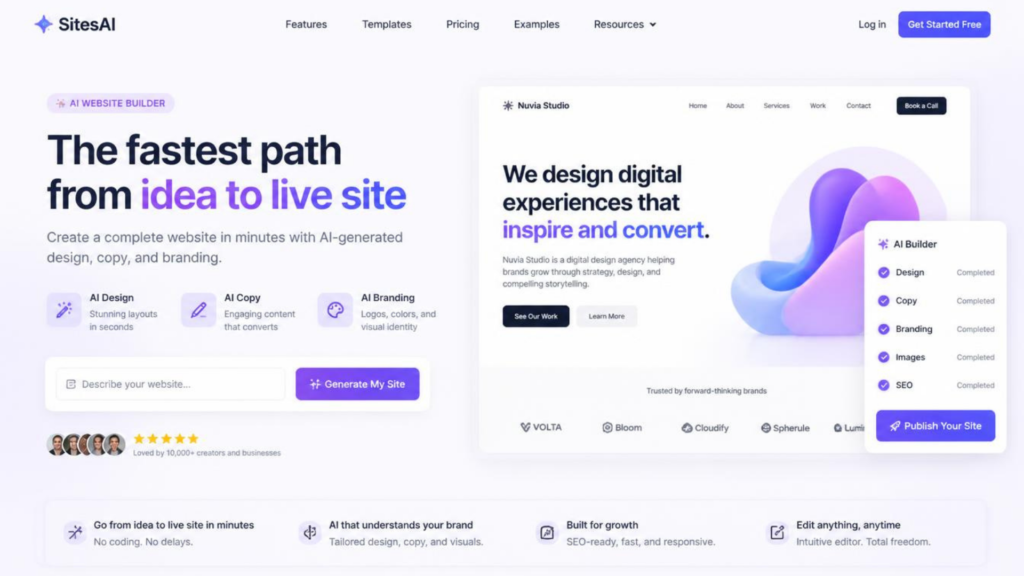
Turn a simple idea into a professional-looking website without starting from a blank page. An AI website builder can dramatically simplify the website creation process by using artificial intelligence to generate design layouts, website copy, branding elements, and page structures based on your goals.
Start With an Idea: Simply describe the type of website you want, your business, niche, audience, and preferred style. AI can use that information to create a starting point for your website.
AI-Generated Design: Instead of spending hours deciding on layouts, sections, fonts, and visual hierarchy, AI can generate a structured design that you can customize to match your brand.
AI-Written Website Copy: Generate headlines, introductions, service descriptions, calls-to-action, and other website content to help you move from concept to a complete website faster.
Branding Assistance: AI-powered tools can help establish a consistent visual direction, including colors, typography, messaging, and overall brand style.
Less Technical Complexity: You don’t necessarily need advanced coding or web-development skills to get started. The AI handles much of the initial setup, allowing beginners and entrepreneurs to focus on their business.
Easy to Customize: AI-generated websites are starting points—not restrictions. You can edit text, images, sections, layouts, colors, and other elements to create a website that fits your specific needs.
Perfect for Entrepreneurs: Whether you’re launching a small business, portfolio, online service, landing page, blog, or new project, an AI website builder can shorten the journey from “I have an idea” → “My website is live.”
Save Time: Traditional website creation can involve researching templates, writing copy, organizing pages, and making countless design decisions. AI can automate much of this initial work so you can reach a usable first version much faster.
Bottom line: An AI website builder isn’t just about creating a website—it’s about reducing the friction between your idea and your online presence, giving you a powerful starting point that you can refine and personalize.
Common Beginner Hosting Problems — and How Hostinger Solves Them
Before diving into pricing and features, it helps to frame this review around the actual problems beginners run into when choosing a host, since that’s usually what brings people to a review like this in the first place.
Problem: “I don’t know anything technical, and hosting control panels look overwhelming.” Solution: Hostinger replaced the traditional cPanel interface with hPanel, a visually guided dashboard where common tasks are explained in plain language, with setup wizards for the parts that used to require technical know-how.
Problem: “I can’t afford expensive hosting while I’m just testing an idea.” Solution: Hostinger’s introductory pricing is among the lowest in the industry, letting you launch a real, fast website for just a few dollars a month while you validate your idea, with the option to upgrade later as traffic grows.
Problem: “I don’t have design skills or a budget for a designer.” Solution: The built-in AI Website Builder generates a complete, editable website — layout, images, and written copy — from a short text description, plus an AI logo maker for basic branding.
Problem: “I’m worried about my site going down or getting hacked.” Solution: Free SSL, free automatic backups on higher-tier plans, malware scanning, and DDoS protection are included by default, without needing to buy separate security add-ons.
Problem: “I need help fast when something breaks, and I don’t want to wait days for an email reply.” Solution: 24/7 live chat support and the Kodee AI assistant are built directly into hPanel, so help is available at any hour without leaving your dashboard.
Problem: “I’m scared of hidden fees and surprise charges.” Solution: While renewal pricing is higher than the introductory rate, Hostinger doesn’t charge unpredictable overage fees for exceeding bandwidth or CPU limits — it simply throttles the connection rather than billing extra, so costs stay predictable.
Keeping these real-world pain points in mind makes the rest of this review easier to evaluate against what actually matters to you.
“Ready to stop comparing and start building? Get Hostinger’s beginner plan now
Customer Support — Help When You Need It

Getting stuck shouldn’t mean putting your website or business on hold. With 24/7 live chat support and Kodee, Hostinger’s in-panel AI assistant, users have access to help directly when they need guidance, troubleshooting, or quick answers.
24/7 Live Chat: Get assistance at any time of day or night through live chat, making it easier to resolve hosting, website, account, or technical questions without waiting for traditional business hours.
Kodee AI Assistant: Kodee works as an AI-powered helper built directly into the Hostinger control panel, providing quick answers and guidance while you’re working on your website.
Instant Assistance: Instead of searching through lengthy documentation for every question, you can use AI assistance to quickly find relevant information and understand the next steps.
Troubleshooting Support: Whether you’re dealing with website setup, hosting features, configuration questions, or other common issues, support resources can help you identify possible solutions faster.
Human + AI Support: The combination of AI-powered assistance and live-chat support gives users both instant self-service guidance and access to human help when a question requires more personalized assistance.
Ideal for Beginners: New to website hosting? Having accessible support can make the learning curve much easier, especially when you’re setting up domains, websites, email, or other online services for the first time.
Business-Friendly Support: For entrepreneurs and businesses, responsive support can help minimize downtime and keep important websites, landing pages, stores, and online services running smoothly.
Bottom line: Great hosting isn’t only about servers and features—it’s also about having someone or something available to help when you run into a problem. With 24/7 live chat and Kodee AI assistance, Hostinger provides multiple ways to get support whenever you need it.
“Ready to stop comparing and start building? Get Hostinger’s beginner plan now
Is Hostinger Easy to Use for Beginners?
The Learning Curve, Realistically
Hostinger isn’t entirely without a learning curve — nothing in web hosting is completely “set and forget.” But compared to older-style panels, most beginners can register a domain, install WordPress or use the AI builder, and publish a live page within their first hour, without needing to read a manual or contact support.This is really the heart of the question in the title, so let’s break it down properly.
hPanel: A Control Panel Built for Non-Technical Users
Traditional hosting dashboards (cPanel, Plesk) were designed by engineers, for engineers. Hostinger replaced that experience with hPanel — a clean, visual dashboard where every major task (installing WordPress, managing email, adding a domain, checking website performance) is a few clicks away, explained in plain language instead of technical jargon.
For someone building their first website, this matters enormously. You don’t need to know what “PHP version” or “DNS zone editor” means to get your site online — hPanel walks you through it with guided setup wizards.
AI Tools That Do the Heavy Lifting
Hostinger has invested heavily in AI features that specifically target beginners who don’t want to design or write everything themselves:
- AI Website Builder — describe your business or blog idea in a short prompt, and Hostinger generates a complete, ready-to-edit website (design, layout, and written copy) in under a minute.
- Kodee, Hostinger’s built-in AI assistant inside hPanel, answers hosting questions in plain English and can perform routine tasks — from creating a database to diagnosing a WordPress error — directly from a chat prompt.
- AI content and logo tools help beginners generate blog copy, product descriptions, and basic branding assets without hiring a designer or copywriter.
One-Click WordPress and App Installs
If you’d rather use WordPress than Hostinger’s own builder, the Auto Installer in hPanel gets a fresh WordPress site running in a couple of clicks, complete with an option to pre-install popular themes and starter templates.
Hostinger Performance: Speed and Uptime in 2026
Cheap hosting has a reputation for being slow and unreliable, so this is the section worth paying closest attention to. Multiple independent testing outlets — including hosting-focused research teams that monitor providers for weeks or months at a time — have published fresh performance data for Hostinger throughout 2026.
Speed Test Results
Across several independent monitoring reports run in 2026, Hostinger has consistently posted strong loading times:
- Time to First Byte (TTFB) figures in recent tests have come in well under one second, with some monitoring runs recording sub-300-millisecond response times on Business-tier plans using the included CDN.
- Largest Contentful Paint (LCP) — a key Google Core Web Vitals metric — has been measured under 2 seconds in most recent tests, and under 1 second in some monitoring windows, which comfortably meets Google’s “good” threshold of 2.5 seconds.
- Full page load times on well-optimized WordPress sites have frequently landed in the 0.6–1 second range during independent GTmetrix and WebPageTest style monitoring.
- One widely cited testing run recorded a Speed Index (a “fully loaded” measurement) of roughly 1.4 seconds, comfortably inside the range considered excellent for real-world visitor experience.
The performance boost mainly comes from Hostinger’s use of LiteSpeed web servers instead of the older Apache software many budget hosts still run, combined with NVMe SSD storage on Business-tier and higher plans, and a built-in content delivery network (CDN) that serves your site from servers closer to your visitors.
“Ready to stop comparing and start building? Get Hostinger’s beginner plan now
How the Testing Is Actually Done
It’s worth understanding where these numbers come from, since “fast hosting” claims are easy to make and harder to verify. The more credible 2026 reviews rely on structured, repeatable testing methods rather than a single anecdotal page load:
- Multi-week monitoring windows. Rather than testing once, research teams check performance repeatedly over two weeks to three months, capturing how a host performs across different times of day and traffic conditions, not just under ideal lab conditions.
- Automated uptime monitoring tools like UptimeRobot and Grafana k6 ping test sites every few minutes around the clock — some reports cite over 8,000 individual checks across a single testing period — to catch even brief outages a one-time check would miss.
- Independent speed benchmarking tools such as Google PageSpeed Insights, GTmetrix, and WebPageTest are used to measure Core Web Vitals from real browser conditions, rather than relying on a hosting provider’s own marketing dashboard.
- Geographic testing from multiple regions (commonly North America, Europe, and Asia) reveals how latency changes depending on where your visitors are located relative to the server — an important detail, since a host that looks blazing fast in one region can perform quite differently in another.
This kind of testing matters because it separates marketing claims from what a real visitor will actually experience. A host that scores well only on a single lab test run under artificial conditions isn’t necessarily going to perform the same way for your actual audience, night after night, month after month.
What Sub-Second Speed Actually Means for a Beginner
Numbers like “707ms TTFB” or “1.4s Speed Index” can be hard to translate into anything meaningful if you’re not a developer. In practical terms:
- Google has stated that page speed is a direct ranking factor, and that a large share of visitors abandon a page that takes more than 3 seconds to load — so sub-second to low-second-range load times give your content a real chance to both rank and retain visitors.
- Fast TTFB means your server starts responding to a visitor’s browser almost instantly, which matters especially for mobile visitors on slower connections.
- Consistent Core Web Vitals scores (rather than a single good test) indicate the performance is coming from solid underlying infrastructure, not a lucky snapshot.
For a beginner, the practical takeaway is that you shouldn’t need to buy a premium, more expensive plan just to get acceptable speed — independent 2026 testing suggests even Hostinger’s entry-level tiers perform competitively against hosts charging two or three times as much.
“Ready to stop comparing and start building? Get Hostinger’s beginner plan now
Uptime Reliability
Hostinger advertises a 99.9% uptime guarantee, and recent independent monitoring generally supports that claim. Testing periods spanning 30 to 90 days across different research teams have recorded uptime figures ranging from about 99.94% up to 100%, which is on par with — or better than — several more expensive hosting brands. Some individual monitoring windows — including a 30-day test using thousands of automated five-minute checks — recorded zero downtime incidents at all.
In practical terms, 99.9% uptime translates to roughly 43 minutes of potential downtime per month. For a personal blog or small business site, that level of reliability is more than sufficient, and it puts Hostinger’s real-world track record well within what WordPress.org’s own hosting requirements recommend for production sites.
Server Locations
Hostinger operates data centers across North America, Europe, Asia, and South America — a wider geographic spread than many budget competitors, which tend to concentrate servers in just the US and Europe. Choosing a data center location close to your target audience during signup will noticeably improve loading speed for your visitors.
Beyond Shared Hosting: Cloud, VPS, and Email
Hostinger isn’t limited to entry-level shared hosting. As your website grows, there are clear upgrade paths that beginners often don’t realize are available from the same provider:
- Cloud hosting offers dedicated resources, higher performance ceilings, and priority support — a natural next step once a site outgrows shared hosting’s traffic limits, typically once you’re seeing more than 50,000 monthly visitors.
- VPS hosting gives you full control over a virtual private server, suitable for developers who want root access, custom software installations, or the ability to host multiple unrelated projects with guaranteed resources.
- Business email hosting lets you create a professional email address using your own domain (like you@yourbusiness.com) instead of relying on a free Gmail or Outlook address, which adds credibility for a small business or freelance brand.
The advantage for beginners is continuity: you can start on the cheapest shared plan, and if your site takes off, upgrading to cloud or VPS hosting happens within the same hPanel account, without needing to migrate to a different provider.
Migrating an Existing Website to Hostinger
If you already have a website hosted elsewhere and want to switch, Hostinger includes a self-service migration tool inside hPanel. In most cases, you upload a backup of your existing site, start the migration directly from your dashboard, and receive confirmation once the transfer is complete — without needing to contact support or hire a developer. For WordPress sites specifically, Hostinger also offers free professional migration assistance on select plans, which is worth confirming during signup if you’re moving an established site with existing traffic you can’t afford to lose.
One caveat worth knowing: migrations from certain proprietary platforms (such as Shopify or Squarespace) generally aren’t supported through the automated tool, since those platforms don’t allow standard website exports. If you’re on one of these platforms, you’ll likely need to rebuild rather than migrate directly.
“Ready to stop comparing and start building? Get Hostinger’s beginner plan now
Hostinger for WordPress: What Beginners Should Know
If you’d rather use WordPress — still the most widely used content management system in the world — Hostinger’s WordPress-specific hosting plans add a few extra conveniences on top of the standard shared hosting features:
- One-click WordPress installation, with the option to start from a curated selection of starter templates.
- Automatic WordPress core updates, reducing the security risk of running outdated software.
- Built-in caching (LiteSpeed Cache), which noticeably speeds up WordPress sites without needing extra plugins.
- Staging environments on higher-tier plans, letting you test changes safely before pushing them live.
- WooCommerce optimization, for beginners planning to launch a small online store.
For most beginners choosing between the AI Website Builder and WordPress, the decision comes down to flexibility versus speed: WordPress offers a larger ecosystem of themes and plugins for long-term customization, while the AI builder gets a polished site live faster with less ongoing maintenance.
Hostinger Pros and Cons
Pros
- Very low introductory pricing compared to most competitors
- Beginner-friendly hPanel dashboard with plain-language guidance
- Genuinely fast performance backed by independent speed and uptime testing
- Free AI website builder with AI copywriting and logo tools included
- Free SSL, free domain (first year), and automatic backups on higher plans
- 24/7 live chat support plus an AI assistant for instant answers
- Wide selection of global data center locations
- 30-day money-back guarantee to test the service risk-free
Cons
- Renewal prices increase significantly after the first billing term
- No phone support, even on higher-tier plans
- Cheapest plan uses SSD rather than the faster NVMe storage
- Not fully PCI DSS compliant, which may matter for larger stores
- Long commitment periods (up to 48 months) are required to unlock the lowest advertised prices
- Switching AI builder templates can disrupt existing site content
Who Should Use Hostinger?
Hostinger is a particularly strong fit for:
- First-time website owners who want a simple, guided setup without technical knowledge
- Bloggers and content creators who need fast page loads and reliable uptime on a budget
- Freelancers and small businesses launching a professional site or portfolio quickly
- Small online stores using WooCommerce or the built-in eCommerce tools, with low to moderate traffic
- Anyone testing a new project or side hustle who wants low upfront cost with the option to scale later
Hostinger is a weaker fit for:
- High-traffic eCommerce stores that need advanced compliance features and dedicated infrastructure
- Businesses that require phone support as a non-negotiable part of their workflow
- Users who dislike long-term contracts, since the best pricing requires longer commitment periods
How to Get Started with Hostinger (Step-by-Step)
- Choose your hosting type. Most beginners should start with shared or WordPress hosting on the Premium or Business plan.
- Select a subscription length. Longer terms unlock lower monthly pricing, but only commit to a length you’re comfortable with given the renewal cost.
- Register or connect your domain. Use the free domain included with your plan, or point an existing domain to Hostinger.
- Pick your building method. Choose the AI Website Builder for the fastest path to a live site, or install WordPress if you want more long-term flexibility.
- Customize your site. Use the drag-and-drop editor or WordPress theme customizer to adjust branding, pages, and content.
- Set up SSL and backups. These are largely automatic, but it’s worth confirming they’re active in hPanel before you go live.
- Publish and promote. Once your site is live, use Hostinger’s built-in SEO tools or your CMS of choice to start optimizing for search traffic.
Frequently Asked Questions
Is Hostinger good for beginners in 2026? Yes. Hostinger’s hPanel dashboard, AI website builder, and guided setup process are specifically designed to remove technical barriers for people building their first website.
Is Hostinger’s cheap pricing actually reliable, or does performance suffer? Independent testing throughout 2026 consistently shows strong speed and uptime results, even on entry-level plans, thanks to LiteSpeed servers and CDN integration — though the cheapest tier lacks the faster NVMe storage available on higher plans.
Does Hostinger offer a free trial? Hostinger doesn’t offer a free plan, but it does provide a 30-day money-back guarantee, which functions as a risk-free trial period for hosting.
Will my Hostinger bill increase after the first year? Almost certainly, yes. The advertised low price applies only to your first billing term. Renewal rates are noticeably higher, so it’s worth checking the listed renewal price before subscribing.
Can I build a store with Hostinger? Yes. Hostinger supports WooCommerce for WordPress-based stores and includes basic eCommerce functionality in its AI Website Builder, suitable for small to moderate-traffic stores.
Is Hostinger better than Bluehost for beginners? Both are beginner-friendly, but Hostinger tends to offer a more modern, easier-to-navigate dashboard and lower introductory pricing, while Bluehost offers phone support, which Hostinger lacks.
Does Hostinger include a free domain? Yes, on annual and longer plans, Hostinger typically includes a free domain for the first year.
Does Hosting Choice Actually Affect Your Website’s SEO?
It’s a fair question for beginners to ask, since the goal of most new websites is eventually to get found on Google. The answer is yes, indirectly but meaningfully. Google has confirmed that page speed is a ranking factor, and Core Web Vitals — metrics like Largest Contentful Paint and Time to First Byte — directly reflect how fast your hosting infrastructure responds. A slow host can hold back an otherwise well-optimized site, while a fast one like Hostinger, backed by LiteSpeed servers and a CDN, gives your content a better technical foundation to rank on.
Uptime matters for the same reason: if search engine crawlers repeatedly hit an unavailable site, it can affect how consistently your pages get indexed and how visitors experience your brand. Choosing a host with strong, independently verified uptime — as Hostinger has demonstrated across multiple 2026 testing reports — removes one more variable that could otherwise work against your SEO efforts.
Final Verdict: Is Hostinger the Best Web Host for Beginners?
Based on 2026 pricing, independent performance testing, and real feature comparisons, Hostinger earns its reputation as one of the best web hosts for beginners. It solves the two biggest problems new website owners face: the technical complexity of setting things up, and the cost of getting started. The combination of hPanel’s simplicity, genuinely fast infrastructure, and free AI tools makes launching a first website faster and less intimidating than with most competitors.
The one thing to plan around is renewal pricing — go in with a clear budget for year two and beyond, and Hostinger is very likely to be one of the strongest hosting choices you can make in 2026, whether you’re starting a blog, a portfolio, or a small online store.
“Ready to stop comparing and start building? Get Hostinger’s beginner plan now